
A Printer is one of those everyday devices that makes the connection between the digital and physical worlds possible. Whether you’re printing a school assignment, preparing an important business document, creating shipping labels, or preserving family photographs, printing technology makes these tasks easier.
In 2026, Printers are more than simple machines that put ink on paper. Modern devices offer wireless connectivity, mobile printing, automatic double-sided printing, and multifunction capabilities. Some advanced systems can even create three-dimensional objects. Understanding how Printers work, their different types, and their essential features can help you make better decisions while saving time and money.
Quick Information About Printers
| Information | Details |
|---|---|
| Device Name | Printer |
| Device Classification | Computer Output Device |
| Primary Function | Producing Physical Output |
| Early Pioneer | Charles Babbage |
| Compact Digital Printer Milestone | Epson EP-101, 1968 |
| HP LaserJet Introduction | 1984 |
| HP DeskJet Introduction | 1988 |
| Common Printer Types | Inkjet, Laser, Thermal, and Dot Matrix |
| Printing Materials | Paper, Labels, Cards, and Other Media |
| Printing Supplies | Ink, Toner, and Ribbons |
| Printing Speed | Measured in Pages Per Minute (PPM) |
| Print Resolution | Measured in Dots Per Inch (DPI) |
| Connectivity | USB, Wi-Fi, and Ethernet |
| Multifunction Capabilities | Printing, Scanning, and Copying |
| Double-Sided Printing | Duplex Printing |
| Advanced Technology | 3D Printing |
| Main Applications | Homes, Schools, Offices, and Industries |
| Maintenance | Cleaning, Software Updates, and Supply Replacement |
What Is a Printer?
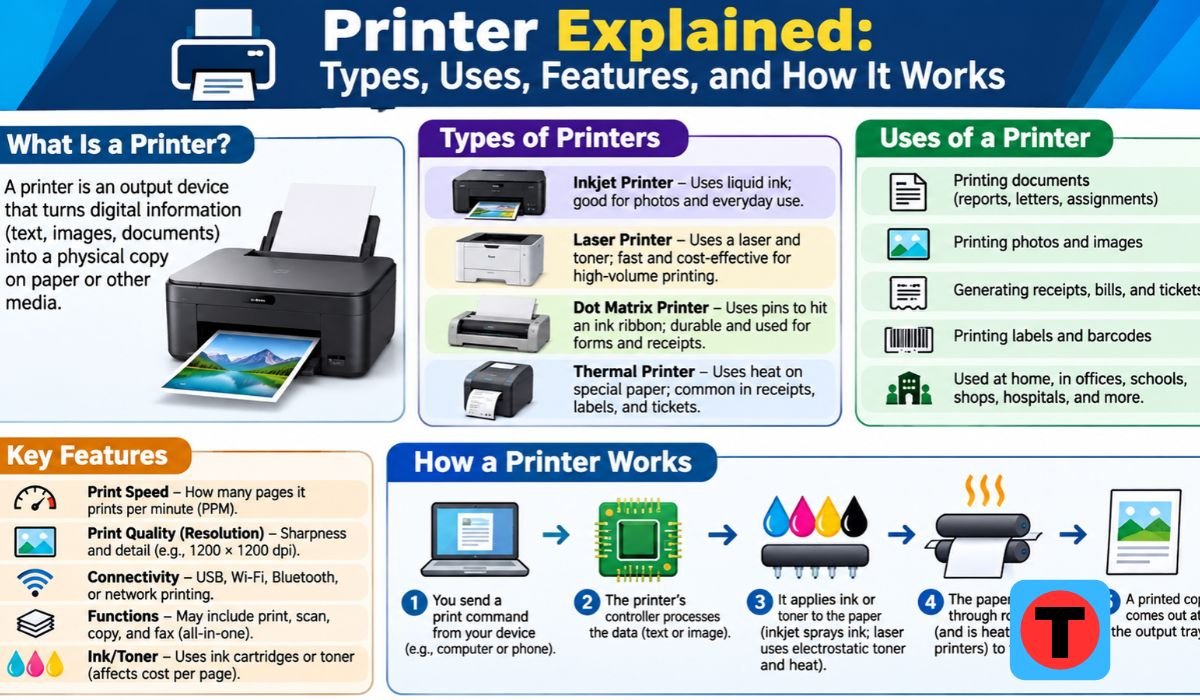
A Printer is a computer peripheral that converts electronic information into physical output. It is generally classified as an Output Device because it receives information from a computer, smartphone, or another digital system and produces a tangible result. Conventional Printers create documents, images, reports, and graphics on paper or other suitable materials. Specialized machines produce Barcodes, Identification Cards, Receipts, and Product Labels. Although digital documents have become increasingly common, physical copies remain useful for recordkeeping, education, business communication, and creative activities. The main purpose of a Printer is to make digital information accessible in a physical format.
History and Evolution of Printers
The history of Computer Printers stretches back to the nineteenth century, when Charles Babbage included mechanical printing equipment in his computing machine designs. His Difference Engine No. 2 was eventually completed in 2002. A major commercial milestone arrived in 1968 when Epson introduced its compact EP-101 Digital Printer. During the 1980s, Dot Matrix Printers were widely used, while HP introduced its LaserJet in 1984 and DeskJet in 1988. These developments helped make personal and professional printing more accessible. Over time, improvements in wireless communication, printing quality, and manufacturing technology transformed Printers into versatile devices that serve many different industries.
Computer History Museum+2
How Does a Printer Work?
The printing process begins when a user sends a document or image from a connected device. Printing Software converts the requested content into instructions that the Printer can understand. Depending on the technology, the machine then transfers ink, toner, or another marking material onto the selected surface. Paper Feed Rollers guide the paper through the machine while internal sensors monitor its movement. Inkjet Printers deposit small droplets of ink, whereas Laser Printers create an electrical image on a drum before transferring toner onto paper and bonding it with heat. Despite their different methods, both technologies turn Digital Information into readable physical documents.
Main Components of a Printer
A Computer Printer contains several components that work together to produce accurate results. An Ink Cartridge or refillable tank stores liquid ink, while a Toner Cartridge supplies powdered toner in applicable Laser Printers. The Printhead controls ink placement in Inkjet models. Paper Trays hold the printing material, and Feed Rollers move it through the device. Laser Printers also contain a photoreceptor drum and a Fuser Unit that bonds toner to paper. The Control Panel allows users to manage settings, while Printer Software handles communication with connected devices. Understanding these components makes routine maintenance and troubleshooting much easier.
Different Types of Printers
There are several Types of Printers, each designed for specific purposes. Inkjet Printers are popular for home printing, photographs, and colorful documents. Laser Printers are particularly useful for producing sharp text and handling larger document workloads. Dot Matrix Printers use an impact mechanism involving pins and an inked ribbon, making them suitable for certain multipart business forms. Thermal Printers use heat-based technology and are commonly used for receipts and shipping labels. Multifunction Printers combine printing, scanning, and copying, with some models also supporting faxing. Choosing the right technology depends on the kind of material being printed and how frequently the device will be used.
Specialized Printers and 3D Printing
Specialized Printers perform tasks that ordinary document printers cannot handle efficiently. Barcode Printers produce labels for inventory management, while Card Printers create identification and membership cards. Large-Format Printers are used for posters, architectural drawings, and advertising materials. Virtual Printers generate digital files, such as PDFs, without producing physical copies. Meanwhile, 3D Printers create physical objects through a process called Additive Manufacturing. They build objects layer by layer using materials such as plastic, resin, or metal. This technology supports product development, engineering, education, and industrial manufacturing, allowing designers to turn digital models into tangible objects.
Department of Energy
Inkjet vs. Laser Printers
The main difference between an Inkjet Printer and a Laser Printer lies in their printing methods. Inkjet models use liquid ink and are often preferred for photographs and detailed color graphics. Laser models use powdered toner and are particularly effective for printing sharp text and large documents. Basic Inkjet Printers may have lower purchase prices, although replacement cartridges can increase long-term expenses. Refillable Ink Tank Printers offer another option for frequent color printing. Laser Printers often provide economical document printing at higher volumes. However, actual printing costs depend on cartridge capacity, maintenance requirements, page coverage, and the specific model.
Personal and Network Printers
Personal Printers are generally designed for individuals, families, and small home offices. They offer convenient access to printing without requiring large or expensive equipment. Network Printers, on the other hand, allow multiple users to share a single machine through a connected network. These devices are especially useful in offices, universities, libraries, and other professional environments. Business Printers may offer larger paper trays, advanced security controls, faster printing, and centralized administration. Sharing a Printer can reduce equipment expenses while improving workplace efficiency, provided that suitable access controls and network security measures are in place.
Common Uses of Printers
Printers support a remarkable range of everyday and professional activities. Students use them for assignments, worksheets, and educational materials, while businesses print invoices, contracts, presentations, and financial records. Retail stores depend on receipt and barcode printing, and logistics companies use shipping labels to track packages. Healthcare facilities produce administrative documents and identification labels. Photographers use Photo Printers to preserve memories, while architects and engineers rely on specialized printing equipment for technical drawings and prototypes. Even in increasingly paperless workplaces, printing remains valuable whenever information must be displayed, shared, signed, or stored in a physical format.
Important Printer Features
Understanding Printer Features helps users compare different models more effectively. Printing Speed is commonly measured in Pages Per Minute (PPM), while Print Resolution is expressed in Dots Per Inch (DPI). Higher resolution can support finer details, although paper and printing technology also influence quality. Automatic Duplex Printing allows both sides of a sheet to be printed without manually turning it over. An Automatic Document Feeder helps Multifunction Printers process multiple pages for scanning or copying. Paper Capacity, Color Printing, Cartridge Yield, and supported paper sizes are equally important when evaluating a device for regular use.
Printer Connectivity Options
Modern Printers provide several ways to connect with computers and mobile devices. USB connections offer a straightforward wired setup, while Ethernet is useful in shared office networks. Wi-Fi enables Wireless Printing from compatible laptops, smartphones, and tablets. Wi-Fi Direct allows supported devices to communicate without relying on a conventional wireless router. Some Printers also support Bluetooth, mobile printing applications, and remote printing services. In 2026, users should consider security alongside convenience. Keeping Printer Firmware updated, protecting administrative settings, and avoiding unnecessary exposure to public networks can help protect confidential documents and connected systems.
Advantages and Disadvantages of Printers
One of the greatest advantages of a Printer is its ability to provide immediate access to physical information. Printed documents are convenient for studying, reviewing contracts, displaying photographs, and completing administrative tasks. However, printing also involves expenses related to paper, electricity, ink, toner, and equipment maintenance. Some machines require frequent cleaning, while others may experience paper jams or connectivity problems. Unnecessary printing can also contribute to environmental waste. The key is to balance the convenience of physical documents with the benefits of Digital Document Management, using printing whenever it genuinely adds value.
How to Choose the Right Printer
Choosing the right Printer begins with understanding your actual printing habits. Someone who primarily prints black-and-white documents may benefit from a Monochrome Laser Printer, while a family interested in colorful school projects and photographs may prefer an Inkjet model. Frequent color printing can make an Ink Tank Printer worth considering. Buyers should compare the initial purchase price with ongoing supply costs, recommended monthly printing volume, warranty coverage, and necessary features. It is also worth checking whether the device requires an account, subscription, or internet connection for particular functions. A good Printer should meet practical needs without creating unnecessary long-term expenses.
HP® Official Site
Common Printer Problems and Maintenance
Paper Jams, faded documents, offline messages, slow printing, and software errors are among the most frustrating Printer Problems. Many connectivity issues can be resolved by checking cables, restarting devices, reviewing network settings, or updating Printer Drivers. Faded output may indicate low ink, insufficient toner, or a maintenance issue. Regularly cleaning accessible components, storing paper in a dry location, and avoiding overloaded paper trays can help maintain reliable performance. Inkjet users should follow recommended Printhead Cleaning procedures rather than running unnecessary cleaning cycles. Always consult the manufacturer’s instructions before attempting internal repairs or handling delicate components.
Microsoft Support
Environmental Impact and Future Technology
The future of Printing Technology increasingly focuses on efficiency, automation, sustainability, and better integration with digital workflows. Automatic Duplex Printing reduces paper consumption, while energy-saving settings help limit electricity use during idle periods. Recycling empty cartridges and responsibly disposing of outdated equipment can also reduce waste. ENERGY STAR provides a useful starting point when comparing energy-efficient imaging equipment. Beyond traditional printing, advances in 3D Printing are opening opportunities for customized manufacturing and complex product designs. As technology develops, Printers are likely to become more connected, resource-efficient, and adaptable to changing personal and professional requirements.
ENERGY STAR
Final Thoughts
A Printer remains an important tool despite the growing popularity of digital communication. From everyday Inkjet Printers to sophisticated Laser and 3D Printing systems, each technology offers advantages suited to different requirements.
Understanding Printer Types, Features, operating costs, and maintenance needs makes it easier to select a reliable device. Whether you’re a student, business owner, photographer, or casual home user, the best Printer is one that delivers the functionality you need while balancing quality, convenience, affordability, and environmental responsibility.
FAQs About Printers
What Is a Printer?
A Printer is an electronic output device that converts digital documents, images, and other information into physical output on paper or other suitable materials.
Is a Printer an Input or Output Device?
A conventional Printer is an Output Device because it receives digital information and produces physical results. A Multifunction Printer also offers input capabilities through its built-in scanner.
What Are the Main Types of Printers?
The main types include Inkjet, Laser, Dot Matrix, Thermal, and 3D Printers. Other categories include Barcode, Card, Photo, Virtual, and Multifunction Printers.
Which Printer Is Best for Home Use?
Inkjet Printers are often suitable for mixed home printing and photographs. Laser Printers can be a better choice for text-heavy documents, while Ink Tank models are worth considering for frequent color printing.
Can a Printer Work Without a Computer?
Yes. Many modern Printers support direct printing from smartphones, tablets, memory cards, or other compatible devices. Available features depend on the Printer model and its connectivity options.
What Is DPI in a Printer?
DPI stands for Dots Per Inch. It measures printing resolution and helps describe how finely a Printer can reproduce text, images, and graphics.
How Can I Reduce Printer Costs?
You can reduce printing expenses by using double-sided printing, appropriate print quality settings, economical ink or toner supplies, and digital documents whenever physical copies are unnecessary.
Learn more and explore exciting content on: Candizi Explained: The Emerging World of Wellness, Creativity, and Digital Innovation











Leave a Reply