
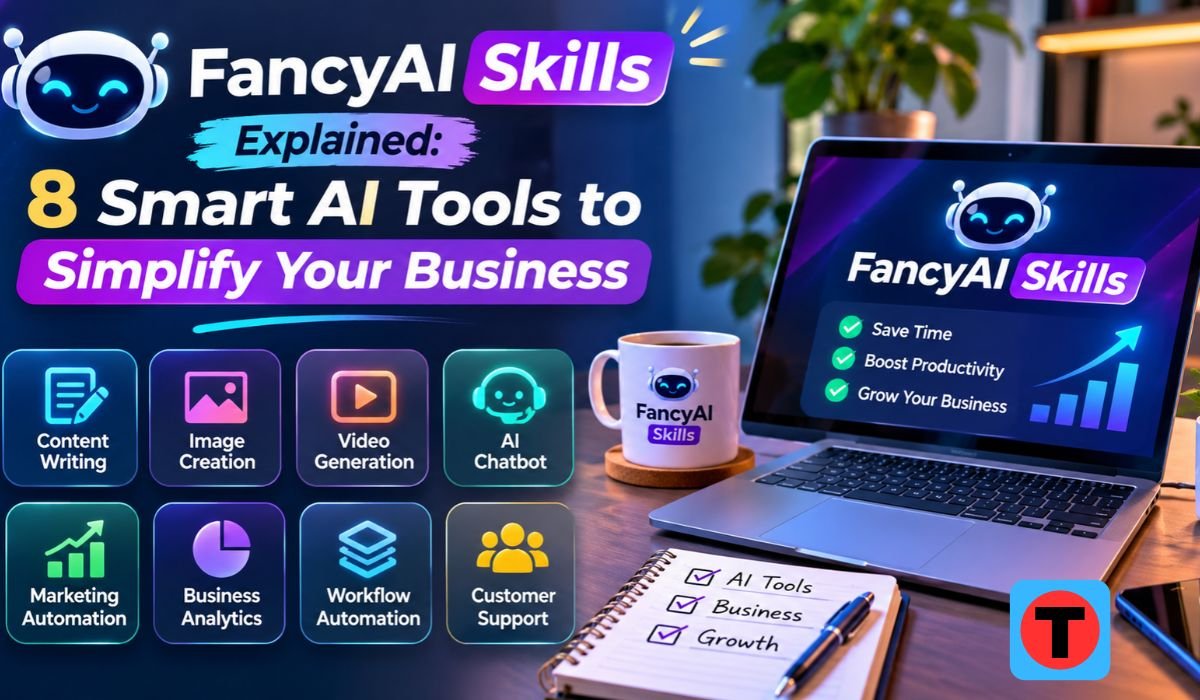
Running a business in 2026 means handling more than sales and customer service. Teams must manage marketing campaigns, organize product information, communicate with customers, and keep digital files in order. These everyday responsibilities can consume valuable time, especially when information is spread across several applications.
FancyAI Skills aim to make these tasks easier through specialized artificial intelligence tools. Instead of using AI only to answer questions or write content, businesses can explore task-focused workflows that connect information, support creative work, and reduce repetitive preparation.
From customer relationship management to advertising and product design, FancyAI describes eight capabilities intended for different business needs. But what do these tools actually offer, and are they worth exploring?
This guide explains the features, benefits, integrations, pricing considerations, and limitations of FancyAI Skills. It also explores how businesses can evaluate these tools safely and measure their practical value.
Quick Bio Information About FancyAI Skills
Platform Name
FancyAI
Product
FancyAI Skills
Technology
Artificial Intelligence
Primary Purpose
Business Workflow Assistance
Advertised Skills
8
Target Audience
Business Teams
Customer Management
CRM Workflows
Product Launches
ERP Launch
Digital Assets
DAM Library
Marketing Content
Campaign Drafting
Advertising
Performance Creative
Social Research
Trend Monitoring
Creative Development
Product Design
Central Workspace
Desktop Command Center
CRM Platforms Mentioned
Salesforce, HubSpot
Design Platform Mentioned
Canva
Developer Offering
AI Experts API
Gateway Pricing
Usage-Based Credits
Desktop Pricing
Requires Confirmation
Official Website
fancyai.com
These details summarize the supplied reference article. Product availability, integration functionality, and current commercial terms should be confirmed directly with FancyAI.
What Are FancyAI Skills?
FancyAI Skills are specialized AI capabilities designed to assist with common business activities. They focus on specific jobs, including preparing marketing content, organizing digital assets, supporting product launches, and managing customer communication.
Unlike a basic chatbot that relies heavily on manually entered instructions, a connected business workflow may use authorized information from existing applications. This can reduce the effort involved in gathering details before starting a task.
FancyAI also describes AI Experts and API-based services. These are related offerings, but they shouldn’t be confused with the eight desktop skills. The exact features available depend on the product and configuration being used.
How Do FancyAI Skills Work?
FancyAI Skills follow a task-focused approach. A business identifies an activity, provides or connects relevant information, and uses AI assistance to prepare an output.
For example, a retailer launching a new product might need specifications from an ERP system and photographs from a digital asset library. A connected workflow could potentially use both sources to prepare initial promotional content.
The important distinction is between assistance and automation. Generating a product description doesn’t necessarily mean the system can publish it automatically. Employees still need to check information, approve content, and understand what actions connected applications permit.
The 8 Smart FancyAI Skills Explained
The eight advertised capabilities cover different parts of business operations. Understanding their individual purposes makes it easier to identify which workflows deserve attention.
CRM Workflows
CRM Workflows focuses on customer relationship activities. It may help teams identify customer groups, prepare personalized follow-ups, and organize engagement campaigns using relevant customer records.
An online store, for instance, could prepare messages for customers who haven’t purchased recently. Accurate records and customer communication preferences remain essential.
ERP Launch
ERP Launch supports product-launch preparation using information associated with enterprise resource planning systems. Its potential uses include preparing product descriptions and related marketing materials.
Businesses introducing many products may find this approach useful, provided employees verify specifications, prices, and availability before publication.
DAM Library
DAM Library focuses on locating and reusing digital assets, including product photographs, logos, templates, and approved creative materials.
For teams managing hundreds of files, easier access to approved resources may reduce searching time and improve brand consistency.
Campaign Drafting
Campaign Drafting helps marketers develop initial campaign materials. These may include promotional headlines, advertising messages, marketing briefs, and landing-page copy.
The capability is best understood as a starting point for creative work. Human editing remains important for accuracy, brand voice, and audience relevance.
Performance Creative
Performance Creative supports the exploration of advertising variations using information from previous campaigns.
Marketers might develop alternative headlines or creative directions for testing. However, clicks alone don’t prove success. Conversions, revenue, and campaign costs provide a fuller picture.
Trend Monitoring
Trend Monitoring aims to identify emerging social media conversations and potential content opportunities.
This may help brands develop timely marketing ideas. Still, businesses should consider whether a trend genuinely relates to their audience rather than following every popular topic.
Product Design
Product Design supports early creative exploration, including visual concepts, patterns, colors, and design directions.
A clothing company might compare several ideas before producing samples. Manufacturing feasibility, material costs, and intellectual property checks remain separate responsibilities.
Desktop Command Center
Desktop Command Center is presented as a central workspace for coordinating connected applications, business files, and AI activities.
Its potential value lies in reducing unnecessary switching between tools. However, the actual benefit depends on supported integrations and how reliably workflows operate.
Key Features of FancyAI Skills
One important characteristic of FancyAI Skills is their focus on recognizable business tasks. Instead of asking employees to build every workflow from scratch, the capabilities are organized around activities that teams already perform.
Another feature is their emphasis on connected information. When authorized business records are accurate and accessible, AI-generated materials may require less manual preparation.
The desktop environment also aims to bring related activities together. Nevertheless, businesses should verify which connections provide information access and which support additional actions.
Benefits of FancyAI Skills for Business Growth
The main potential benefit of FancyAI Skills is improved efficiency. Preparing first drafts, searching for approved images, and gathering product details can take considerable time.
AI assistance may shorten some of these activities, allowing employees to spend more attention on planning, customer relationships, and important decisions.
Connected workflows may also support more consistent communication when they use reliable product information and approved brand materials.
However, productivity must include editing and review time. A draft produced in seconds offers little advantage if correcting it takes longer than completing the task manually.
How FancyAI Skills Can Help Different Businesses
E-commerce businesses may find value in product descriptions, launch preparation, customer follow-ups, and advertising development. These activities often repeat and depend on information already stored digitally.
Marketing agencies may benefit from campaign drafting and digital asset organization, especially when managing multiple clients.
Design teams could explore product concepts before committing resources to physical prototypes. Meanwhile, small businesses might begin with a single recurring marketing activity rather than implementing several workflows at once.
The strongest opportunities generally involve tasks that happen frequently, use dependable information, and have measurable outcomes.
FancyAI Skills Integrations and Supported Platforms
FancyAI’s official desktop page lists connections involving Salesforce, HubSpot, ERP systems, digital asset libraries, Meta Ads, TikTok Ads, Instagram, Slack, Gmail, Google Drive, Notion, and Canva. These platforms cover customer management, advertising, communication, file storage, and creative work.
Open Platform+1
For businesses, the main attraction is connecting information that normally lives in separate systems. A marketing team could potentially combine customer insights, product specifications, and approved images when developing a campaign.
However, listed integrations don’t guarantee identical functionality. Companies should confirm supported actions, access permissions, setup requirements, and additional charges before connecting sensitive systems.
How to Get Started With FancyAI Skills
The most practical starting point is identifying one repetitive task with a clear outcome. Preparing product descriptions, organizing campaign assets, or drafting customer follow-ups are possible examples.
Businesses can then review the FancyAI Desktop page to understand the advertised capabilities and installation options. Before connecting applications, they should confirm account requirements, supported systems, and permissions.
A small trial should include human review from the beginning. Compare the time required to complete the task manually with the full AI-assisted process, including corrections and approvals. Expand only when the results justify the effort.
FancyAI Skills Pricing in 2026
FancyAI publishes usage-based pricing for its model gateway. The official pricing page shows credit purchase amounts of $10, $25, $50, and $100, alongside a custom amount option. It also describes pay-as-you-go billing without a required subscription and balances that do not expire.
FancyAI
These prices should not be mistaken for confirmed desktop subscription rates. The publicly displayed gateway credits do not establish the cost of every FancyAI Skill, enterprise integration, or custom deployment.
Businesses should request applicable desktop pricing and consider implementation, training, and ongoing usage expenses before calculating their total investment.
FancyAI Skills vs. Traditional AI Tools
Traditional AI assistants are useful for writing, research, brainstorming, and answering questions. Users often supply the relevant information through prompts, documents, or connected tools.
FancyAI Skills emphasize specialized business workflows involving existing company information. For example, an ERP-connected process may help prepare marketing materials from product records rather than requiring employees to copy every specification manually.
Still, this distinction isn’t absolute. Other AI platforms also offer integrations, specialized agents, and workflow automation. The better choice depends on reliability, security, available features, and cost rather than product labels alone.
Advantages and Limitations of FancyAI Skills
FancyAI Skills may offer advantages for teams handling repetitive activities. Task-focused assistance can support content preparation, digital asset discovery, and coordination between business applications.
The limitations deserve equal attention. AI outputs may contain inaccurate information, integrations may require technical configuration, and employees may need training.
Businesses should also avoid assuming that every advertised capability will work with their existing systems without additional setup. A successful implementation requires dependable records, suitable permissions, and clearly defined responsibilities.
Are FancyAI Skills Safe for Business Data?
Security becomes especially important when AI tools connect to customer records, internal documents, or unpublished product information.
Before using FancyAI Skills with confidential data, organizations should review the platform’s privacy terms and establish which employees and applications can access particular information.
FancyAI’s published privacy documentation discusses the collection and processing of information associated with accounts, APIs, payments, and AI-generated content. Businesses should review the applicable terms carefully rather than assuming all information remains exclusively on a local computer.
test.fancyai.com
Human approval is particularly important for customer messages, financial information, advertising claims, and actions that could affect business operations.
How to Measure the ROI of FancyAI Skills
Return on investment should be measured through actual improvements rather than the number of AI features available.
Consider a hypothetical retailer preparing 40 product listings monthly. If AI assistance saves 12 minutes per listing after corrections and review, the business saves eight hours each month.
That calculation demonstrates potential time savings, not verified FancyAI performance.
To determine financial value, the retailer must also consider software costs, employee time, implementation expenses, and content quality. A useful workflow should produce accurate results while reducing overall effort.
Common Mistakes to Avoid With FancyAI Skills
One common mistake is attempting to automate too many activities immediately. This makes it difficult to identify which workflows actually deliver improvements.
Another is relying on inaccurate business records. Incorrect specifications or outdated customer information can lead to misleading AI-generated content.
Companies should also avoid publishing unreviewed materials or granting unnecessary application permissions. Starting with one manageable workflow, establishing approval rules, and measuring outcomes provides a safer foundation.
Who Should Use FancyAI Skills?
FancyAI Skills may appeal to e-commerce retailers, marketing agencies, creative teams, and organizations managing regular product launches.
These businesses often depend on repeated tasks and information stored across several digital systems. Better coordination could help employees spend less time gathering materials.
However, companies producing only occasional marketing content may not require a connected enterprise platform. A simpler AI assistant might meet their needs at a lower operational cost.
The decision should begin with a business problem, not a desire to adopt more technology.
The Future of FancyAI Skills and Business Automation
Business AI is gradually moving beyond isolated content generation toward workflows that connect information, applications, and practical tasks.
FancyAI’s desktop offering reflects this direction through its emphasis on customer engagement, product launches, advertising, and creative development.
Future value will depend less on how many functions a platform advertises and more on how reliably those functions operate. Accurate information, sensible permissions, measurable outcomes, and human judgment will remain essential.
Final Thoughts
FancyAI Skills present an interesting approach to business productivity by organizing artificial intelligence around eight practical capabilities. From CRM Workflows and ERP Launch to Campaign Drafting and Product Design, the platform aims to bring business information and creative activities closer together.
Its potential benefits include faster preparation, easier access to digital resources, and better coordination between existing systems. However, those advantages depend on reliable integrations, accurate information, appropriate security, and realistic costs.
For businesses considering FancyAI in 2026, the best approach is to test one meaningful workflow, review the results, and expand only when the benefits are clear.
The real goal of AI automation isn’t simply to produce more work faster. It’s to help people complete valuable work more accurately and efficiently.
FAQs About FancyAI Skills
What Are FancyAI Skills?
FancyAI Skills are eight advertised AI capabilities designed to support activities such as customer management, product launches, marketing, digital asset organization, and creative development. They focus on practical business workflows rather than general conversation alone.
How Many FancyAI Skills Are Available?
FancyAI’s desktop page describes eight named skills: CRM Workflows, ERP Launch, DAM Library, Campaign Drafting, Performance Creative, Trend Monitoring, Product Design, and Desktop Command Center. Availability and functionality may vary by configuration.
Are FancyAI Skills Free?
FancyAI publishes pay-as-you-go gateway pricing, but that does not confirm free access to all eight desktop skills. Businesses should check current desktop access requirements and commercial terms before registering or purchasing credits.
Can Beginners Use FancyAI Skills?
Beginners may find individual tasks approachable, particularly when they involve content drafting or creative exploration. However, connecting enterprise applications such as CRM and ERP systems may require administrator permissions or technical assistance.
Can FancyAI Skills Improve Digital Marketing?
FancyAI Skills may support campaign drafts, advertising variations, trend research, and creative asset organization. Whether these activities improve marketing results depends on audience targeting, content quality, campaign execution, and measurable performance.
Does FancyAI Integrate With Salesforce and HubSpot?
FancyAI lists Salesforce and HubSpot among its desktop integration offerings. Businesses should confirm the available connection methods, supported records, permissions, and whether their intended workflows can be completed through those integrations.
Are FancyAI Skills Safe for Business Information?
Their suitability for sensitive information depends on the relevant data-handling arrangements, permissions, security controls, and organizational requirements. Companies should review official privacy documentation and test access restrictions before connecting confidential records.
Can FancyAI Skills Replace Human Employees?
FancyAI Skills may assist employees with repetitive preparation, content creation, and information organization. They do not remove the need for human expertise in strategy, accuracy, customer relationships, compliance, and important business decisions.
Learn more and explore exciting content on: Prevention Cloud Explained: Features, Benefits, Rewards, and More










Leave a Reply