
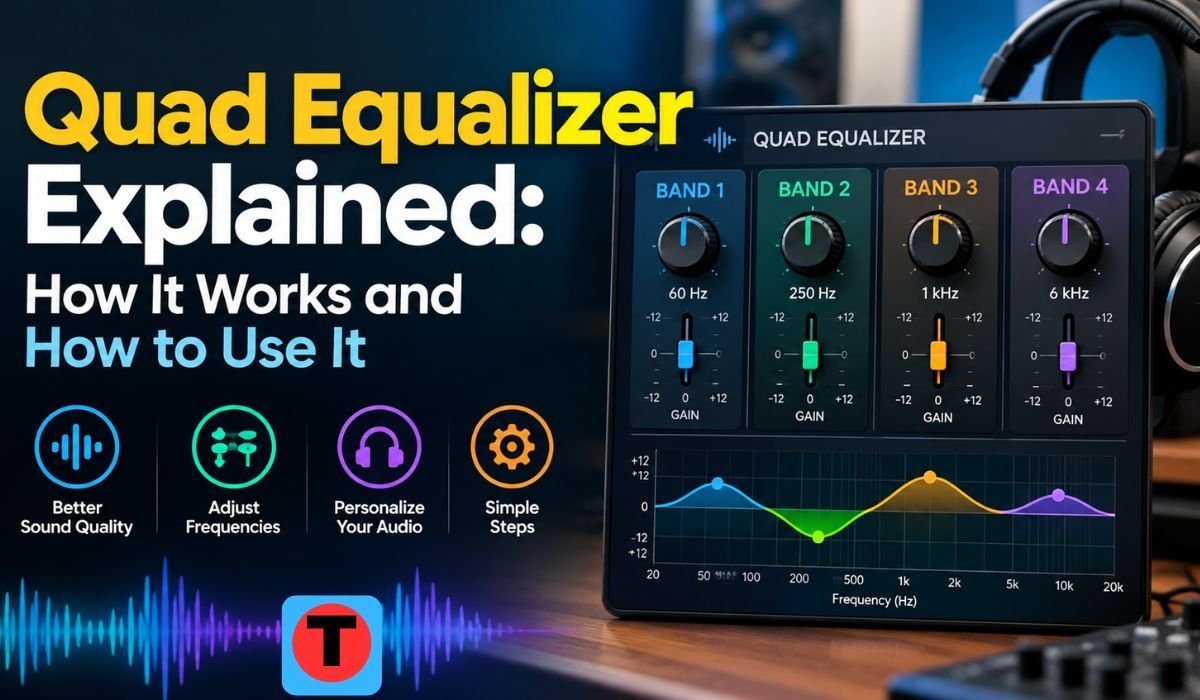
Good audio is not always about having more bass, more treble, or louder volume. Sometimes a song sounds muddy, a podcast voice feels distant, headphones sound too bright, or a gaming headset makes explosions overpower important details. This is where a Quad Equalizer can become useful. In simple terms, an equalizer changes the balance of different frequency areas in an audio signal. A Quad Equalizer may refer to a four-band audio equalizer, although the word “quad” can also describe equipment that processes four separate channels. Because the term is not completely standardized, understanding what your particular device means is the first step. Yamaha documentation, for example, describes equalization through controls such as frequency, gain, and Q, while Texas Instruments also uses “quad equalizer” terminology for four-channel high-speed signal hardware rather than audio tone control.
What Is a Quad Equalizer?
A Quad Equalizer is generally understood in consumer audio as an equalizer with four adjustable frequency areas. Instead of changing the entire sound equally, it lets you increase or decrease selected parts of the audio spectrum. These areas are commonly described as low, low-mid, high-mid, and high frequencies. However, the exact frequency points depend on the product. In another context, “quad” can mean four independent channels, with each channel receiving its own equalization. This distinction matters because a four-band EQ and a four-channel EQ are not the same thing. A four-band EQ can shape four frequency regions in one signal path, while a four-channel system can process four separate signals. Some professional audio equipment can even combine multiple channels with several EQ bands on each channel.
How a Quad Equalizer Works
An equalizer works by changing the level of selected frequencies. A boost raises a frequency range, while a cut lowers it. The purpose is not normally to make every part of the spectrum louder, but to create a more balanced and suitable sound. A typical four-band design gives broad control over the bass, lower midrange, upper midrange, and treble. Graphic EQs generally use fixed frequency bands, whereas parametric EQs allow more precise control over frequency, gain, and bandwidth or Q. Yamaha explains that a higher Q produces a narrower adjustment, while a lower Q affects a wider range of frequencies. This is why a parametric Quad Equalizer can be particularly useful when a listener wants to target a specific resonance rather than change a large portion of the sound.
Understanding the Four Frequency Bands
The Low Frequency area is responsible for much of the weight and impact in music. Bass guitar, kick drums, deep electronic sounds, and low-frequency rumble live here. Too much low energy can make sound boomy or overwhelm smaller speakers, while too little can make music feel thin. The Low-Mid Frequency area contributes warmth, body, and fullness but can also create muddiness or a box-like character when excessive. The High-Mid Frequency region has a strong influence on presence, speech clarity, attack, and perceived detail. Shure notes that the broader 2 kHz to 5 kHz area is important for clarity but can become harsh when overemphasized. The High Frequency area contributes brightness, brilliance, cymbal detail, and air, although excessive energy can make headphones tiring or emphasize sibilance. These descriptions are useful guides rather than fixed rules because every Quad Equalizer may divide the spectrum differently.
Understanding Frequency, Gain, and Q
Three terms are especially important when using an adjustable equalizer: Frequency, Gain, and Q. Frequency tells you where the adjustment is centered. Gain tells you how strongly that frequency area is boosted or reduced, usually in decibels. A positive value increases the selected region, while a negative value reduces it. Q describes the width of the adjustment. A narrow Q can target a specific problem, while a wider Q changes a broader portion of the spectrum. Yamaha’s current audio documentation uses these same controls for parametric EQ and also provides flat and bypass functions for comparison and adjustment. Once these three controls make sense, EQ becomes much less mysterious. Instead of randomly moving sliders, you can ask what frequency is causing the problem, how much it should change, and how wide the correction needs to be.
Quad Equalizer vs. Graphic and Parametric EQ
A Quad Equalizer should not automatically be treated as a synonym for either a graphic or parametric equalizer. A four-band graphic-style EQ normally provides a small number of fixed frequency controls and is relatively easy for beginners. A parametric EQ offers greater flexibility because the user can often choose the center frequency, gain, and Q. Yamaha describes graphic EQ as using fixed frequency bands, while parametric EQ allows the frequency and width of the affected range to be selected. This difference is important when shopping for software or hardware because “four bands” tells you how many adjustment sections are available, but it does not necessarily tell you how flexible those sections are.
Quick Bio Information
| Fact | Information |
|---|---|
| Term | Quad Equalizer |
| Main Purpose | Adjusting the tonal balance of audio |
| Common Audio Meaning | Four-Band Equalizer |
| Another Meaning | Four-Channel Equalization |
| Main Frequency Areas | Low, Low-Mid, High-Mid, High |
| Basic Adjustment | Boost or Cut |
| Gain Unit | Decibels (dB) |
| Parametric Control | Frequency, Gain, and Q |
| Low Band | Bass, weight, and rumble |
| Low-Mid Band | Warmth, body, and muddiness |
| High-Mid Band | Presence and clarity |
| High Band | Brightness and brilliance |
| Flat Setting | 0 dB adjustment |
| Bypass | Temporarily removes the EQ effect |
| Best Starting Approach | Begin Flat |
| Useful Comparison | Match listening volume |
| Common Risk | Clipping from excessive boosts |
| Main Limitation | Cannot fix every hardware or acoustic problem |
What Can a Quad Equalizer Improve?
A Quad Equalizer is most useful when you can identify a specific sound problem. If headphones have excessive bass, a modest low-frequency cut may make vocals and instruments easier to hear. If a speaker sounds dull, a careful high-frequency adjustment may add brightness. If speech sounds muddy, reducing some low or low-mid energy can sometimes make the voice appear clearer. EQ can also help shape music for personal preferences and compensate for some tonal characteristics of headphones or speakers. However, it should not be treated as a magic audio repair tool. Equalization changes the balance of frequencies already present in the signal. It cannot recreate information that was never recorded, repair a physically damaged speaker, or turn a tiny speaker into a true subwoofer.
How to Use a Quad Equalizer Step by Step
The safest starting point is a Flat EQ, where the available bands are set to 0 dB. If your system includes bass boost, loudness processing, virtual surround, or other enhancements, temporarily disabling them can make the effect of the EQ easier to understand. Next, listen to familiar material and identify one problem rather than adjusting everything at once. If the sound is boomy, investigate the low or low-mid region. If it is harsh, examine the upper midrange or treble. Make a small adjustment and listen again. Shure recommends approaching equalization slowly, listening carefully after each change, using familiar material, and making frequent use of a bypass function as a reference. Comparing at approximately the same volume is also important because louder audio can seem more impressive even when the tonal balance has not improved.
Quad Equalizer Settings for Music
There is no universal Best Quad Equalizer Setting for Music because recordings, headphones, speakers, rooms, and personal preferences vary. A useful approach is to make the smallest change that solves the problem. If bass is overwhelming vocals, reducing the low end may work better than boosting the treble dramatically. If music feels thin, a modest low or low-mid increase may provide additional body. If cymbals or vocals sound aggressive, a small high or high-mid reduction may be appropriate. The goal should be balance rather than an impressive-looking EQ curve. When several frequencies are boosted together, the overall signal level can rise, reducing available headroom. For that reason, some systems provide preamp or output controls that can be reduced after boosting.
Quad Equalizer for Voice, Podcasts, and Gaming
For Voice and Podcasts, EQ can help improve intelligibility when the recording has an obvious tonal imbalance. Shure’s audio guidance notes that speech clarity can often benefit from attention to the midrange and that the exact frequency and amount of adjustment depend on the system. EQ cannot, however, remove every background problem. Keyboard noise, room echo, traffic, and constantly changing background sounds may require microphone improvements, noise reduction, acoustic treatment, or better recording conditions. For Gaming, excessive bass can sometimes dominate quieter details such as footsteps or environmental sounds. A cleaner low end with controlled presence may make certain cues easier to hear. Still, a Quad Equalizer does not create positional audio by itself. Directional gaming performance also depends on the game’s audio engine, headphones, spatial processing, and other system factors.
Practical Quad Equalizer Starting Settings
Starting values can help beginners understand the relationship between the four bands, but they should be treated as starting points rather than universal presets. For clear dialogue, a modest reduction around the low and low-mid areas combined with a small presence increase may be useful. For competitive gaming, reducing excessive low energy while keeping the presence region controlled can create a cleaner presentation. Warm music may benefit from a slight low or low-mid increase, while bright headphones may sound more comfortable with a modest reduction in the upper frequencies. A boomy car system can often benefit from reducing the problem area rather than continually increasing bass. The important principle is to listen after each change. A setting that sounds excellent on one pair of headphones can sound poor on another because every playback device has its own frequency response.
Useful Quad Equalizer Features
The most useful Quad Equalizer features depend on how much control you need. Adjustable frequency points are valuable when a fixed band is too broad to address a particular problem. Gain control allows the strength of the correction to be changed, while Q determines its width. A Bypass function is especially helpful because it lets you compare the processed and original signals. Yamaha documentation also provides Flat and Bypass controls in its EQ interfaces, demonstrating how these functions can support practical adjustment. Device-specific presets are useful because headphones, speakers, cars, and soundbars rarely behave identically. Channel linking can also be important on equipment that genuinely uses four independent channels. A spectrum analyzer can provide a visual reference for frequency energy, although the graph should support listening rather than replace it.
How to Avoid Clipping and Common Mistakes
One of the biggest Quad Equalizer mistakes is assuming that every band should be boosted. Large boosts can make audio unnatural and may reduce available headroom. Digital clipping can occur when the resulting signal exceeds the system’s available level. Another common mistake is copying an EQ preset without checking its actual frequency points. Two equalizers may use completely different bands, so identical-looking numbers can produce different results. Users should also avoid changing all four controls at once because it becomes difficult to know which adjustment helped. Applying multiple EQ profiles through a phone, music application, operating system, speaker, or headphone software can also produce unexpected results. Starting Flat, changing one thing at a time, and comparing at a consistent volume is a much more reliable approach.
What a Quad Equalizer Cannot Fix
A Quad Equalizer has clear limits. It can reshape the frequency balance of an audio signal, but it cannot repair a damaged driver or create physical speaker performance that the hardware does not have. It cannot restore detail removed by poor recording or excessive compression. EQ may reduce certain fixed noises, such as some low-frequency rumble, but broad frequency cuts can also remove useful parts of speech and music. It also cannot replace good speaker placement, proper headphone fit, microphone technique, room treatment, or dedicated noise-processing tools. In larger audio systems, equalization may be only one part of the solution. Yamaha’s room-correction systems, for example, use measurements of speaker and room behavior alongside parametric EQ rather than relying on EQ alone.
How to Create Your Own Quad Equalizer Preset
Creating a personal preset is easier when the process is treated as controlled listening rather than experimentation without a plan. Start with Flat settings and use a recording you know well. Identify one noticeable issue and select the frequency band most likely to influence it. Make a small cut or boost, then return to the original sound using Bypass. If the change is helpful, keep it modest and move to the next problem only when necessary. After finishing, save the profile with a useful name that identifies the device and purpose. For example, a headphone profile and a desk-speaker profile should normally be treated as separate settings. This approach keeps the Quad Equalizer practical and prevents one correction from being mistakenly applied to every listening system.
Final Thoughts
A Quad Equalizer is a simple idea with surprisingly useful applications. Whether it appears as a four-band tone control or as part of a more advanced multi-channel system, its main purpose is to give listeners greater control over the balance of sound. The most important lesson is that effective EQ is rarely about making dramatic changes. Starting Flat, identifying a specific problem, making a small adjustment, and comparing the result at a consistent volume usually produces more useful results than turning every control upward.
For beginners, the four broad areas of Low, Low-Mid, High-Mid, and High provide an easy way to understand what is happening. More advanced users can take advantage of Frequency, Gain, and Q controls to make more targeted changes. With realistic expectations and careful listening, a Quad Equalizer can become a practical tool for improving music, speech, gaming, headphones, speakers, and other everyday audio experiences.
FAQs About Quad Equalizer
What Is a Quad Equalizer Used For?
A Quad Equalizer is used to adjust different parts of an audio signal. In a common four-band design, the controls broadly cover low, low-mid, high-mid, and high frequencies. It can help manage excessive bass, improve perceived voice clarity, reduce harshness, or adjust the overall tonal balance of headphones and speakers.
Does Quad Mean Four Frequency Bands?
Not always. In many audio products, “quad” can refer to four frequency bands, but it can also describe four independent channels. The product’s manual or interface should be checked before assuming what the term means.
What Is the Best Quad Equalizer Setting?
There is no single setting that works best for every person and every device. A useful starting point is Flat, followed by small adjustments based on an audible problem. The ideal result depends on the recording, playback equipment, room, listening volume, and personal preference.
Can a Quad Equalizer Improve Voice Clarity?
Yes, EQ can sometimes improve perceived voice clarity by reducing excessive low-frequency energy or carefully adjusting frequencies associated with speech presence. However, EQ cannot compensate for every recording problem, and microphone placement, room acoustics, and noise control can be equally important.
Should I Boost or Cut Frequencies?
Both can be useful, but a modest cut is often a good first response when one area is dominating the sound. Reducing an excessive frequency can create space without requiring large boosts elsewhere. The best choice depends on the actual problem.
Can EQ Cause Distortion?
Yes. Large boosts can increase signal level and reduce headroom, potentially causing clipping or distortion. If several bands are boosted, reducing the preamp or output level may help maintain headroom.
Does a Quad Equalizer Improve Gaming Audio?
It can change the tonal balance of gaming audio and may make certain sounds easier to hear. However, EQ does not create positional audio. Directional performance also depends on the game, headset, spatial processing, and audio system.
Can I Use One Quad Equalizer Preset on Every Device?
You can, but the result may not be consistent. Different headphones, speakers, soundbars, and car systems have different frequency responses. Device-specific presets are generally more practical when the EQ is being used for correction rather than simply personal taste.
Learn more and explore exciting content on: Pappedeckel Explained: Meaning, Uses, Materials, and Key Facts












Leave a Reply